Service line inventory
Import the city's list once. Material on each side, category, premise ID, coordinates. Two services at one address stay two records.
Lead service line field operations
Inventory, test pits, right of entry, markouts, routing, restorations — and the photo, video and signature behind every one. Captured at the curb on a phone, not retyped from a notebook at nine o'clock at night.
Built by a contractor running lead line programs, on live jobs, in New Jersey.
Why it exists
Every property on a lead program generates a record: what the service line is made of on both sides, who looked, when, with what evidence, whether the owner let you in, whether the markout was valid on the day you dug, what you put back and what it should be paid at.
Most of that record ends up spread across a spreadsheet, a phone's camera roll, an inbox and somebody's memory. It holds together until the engineer asks about one address from three months ago, or the city gets a resident complaint, or the state asks for the inventory.
Gooseneck keeps it in one place, entered once, by the person standing at the curb. The crew screens are built for a phone in the rain with gloves on. The office side is built for the question you actually get asked: what is happening at this address?
It was not designed in a product meeting. It was built on live replacement programs, by the contractor running them, and every screen in it exists because a crew needed it on a Tuesday.
What it does
Each piece writes into the same property record, so nothing has to be reconciled later.
Import the city's list once. Material on each side, category, premise ID, coordinates. Two services at one address stay two records.
Findings at the curb stop with photos, depth, connection material and the engineer inspector's sign-off. No property is called a replacement until both sides are actually identified.
Signed at the door on a phone, or by the homeowner online from a link the city can publish. Produces a PDF, filed against the property. Refusals and the reason are recorded too.
One Call tickets tracked against the blocks they cover, with valid-from and expiry on the crew's screen. An expired markout stops the dig before the crew is standing on it.
Build a route that sweeps outward from the yard, then export a two-week day-by-day plan with maps — the document the crew works to and the city posts no-parking signs from.
Photo and video of the frontage before anything is opened, stamped and filed against the property. The thing you reach for when a driveway was already cracked.
Open restorations as a live list with days outstanding, and every pay quantity logged as the work is recorded rather than reconstructed at the end of the month.
One address, everything known about it, evidence attached, printable as a PDF. This is what gets sent when somebody asks what happened at a house.
Properties by stage, test pits done, replacements, restorations open and closed, unresponsive homes — the numbers a progress meeting actually runs on.
What it looks like
Five screens, in the order a property moves through them — routing the week, the record it builds, the look-ahead the city works to, the number the engineer asks for on a Monday morning, and the live play-by-play on your phone.
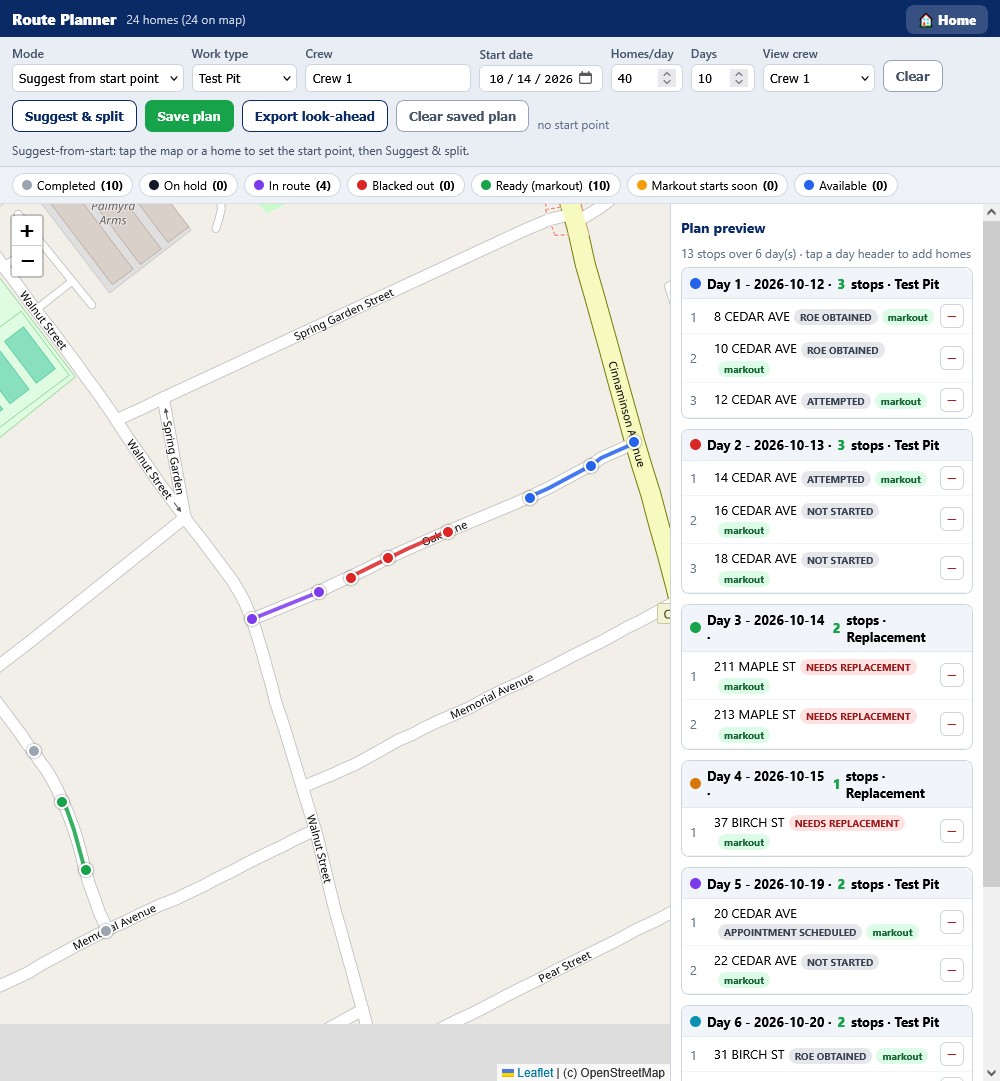
Tell it the crew, the work type, how many homes a day and how many days, tap a start point, and press Suggest & split. It takes the homes that are ready for that work, walks them from where the crew starts, and splits them into days.
Every home is on the map in the color of its state, and the legend counts them: completed, in route, ready with a markout, markout starting soon, on hold, blacked out, and available. The plan preview lists each day with its stops, and each stop shows where that home has got to and whether a markout covers it.
Lead found — both sides Replaced 2 Oct Restoration open 6 days
The service
Who said yes, and when
Legal to dig
Who did the work
Photographs — 11 on file
Documents
This is what the city opens when a resident rings up, and what the engineer opens before approving a payment. Material on both sides of the curb stop, who signed the right of entry and on what day, the One Call ticket the hole was legal under, who dug it, which inspector stood there, and every photograph with the time and the coordinates burned into it.
None of it was retyped from a notebook at nine o'clock at night. It was recorded at the curb, on a phone, by the person doing the work.
| Date | Address | Work | Markout |
|---|---|---|---|
| Week of 12 October | |||
| Mon 12 | 204–214 MAPLE ST | Test pit ×6 | Valid to 26 Oct |
| Tue 13 | 31–39 BIRCH ST | Test pit ×5 | Valid to 26 Oct |
| Wed 14 | 12–20 BROAD ST | Replacement ×5 | Expires Thu 15 |
| Thu 15 | 18–22 CEDAR AVE | Replacement ×3 | Call in by Wed |
| Fri 16 | 204–208 MAPLE ST | Restoration ×3 | Not required |
| Week of 19 October | |||
| Mon 19 | 40–48 CANAL ST | Test pit ×4 | Blackout lifts 17 Oct |
| Tue 20 | 8–16 CEDAR AVE | Test pit ×5 | Valid to 2 Nov |
| Wed 21 | 31–35 BIRCH ST | Replacement ×3 | Valid to 2 Nov |
CANAL ST is blacked out 12–16 Oct for city paving; those four homes are held to week two. One block on CEDAR AVE needs calling in to One Call before Wednesday.
The same plan, as the document everybody outside the crew actually works from. The city posts no-parking signs off it, the engineer schedules inspectors against it, and residents get told which day their water goes off.
It carries the markout column, because a date the crew cannot legally dig on is a date nobody should be putting a sign up for. Exported as PDF and Excel, and emailed the moment it is produced.
Pipeline
Key numbers
Markouts & blackouts
This week
One screen for the city, the engineer and the contractor, reading off the records the crews filled in that morning. How many homes have been knocked on, how many said yes, how many pits are dug, how much lead has been found, how many streets are back in one piece — and how far through the contract base the replacements are.
Every number opens the list behind it. “Fifty-three restorations open” becomes fifty-three addresses with the date each one was dug, which is what somebody needs when they are about to do something about it rather than just report it.
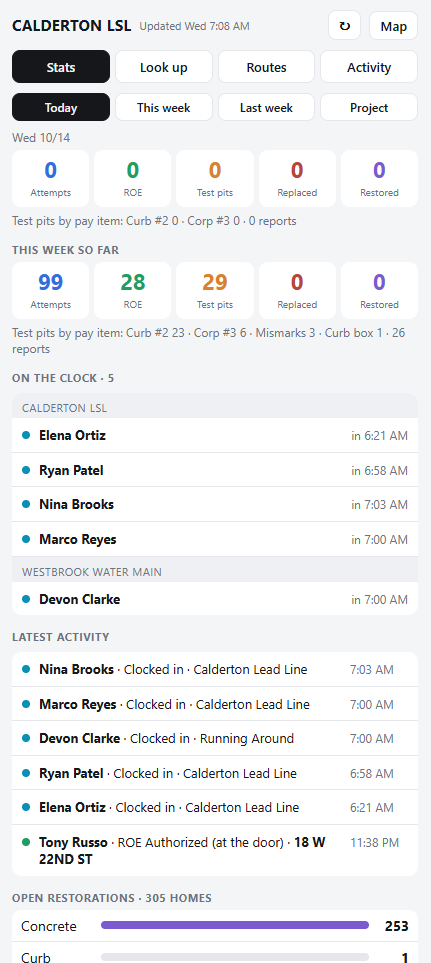
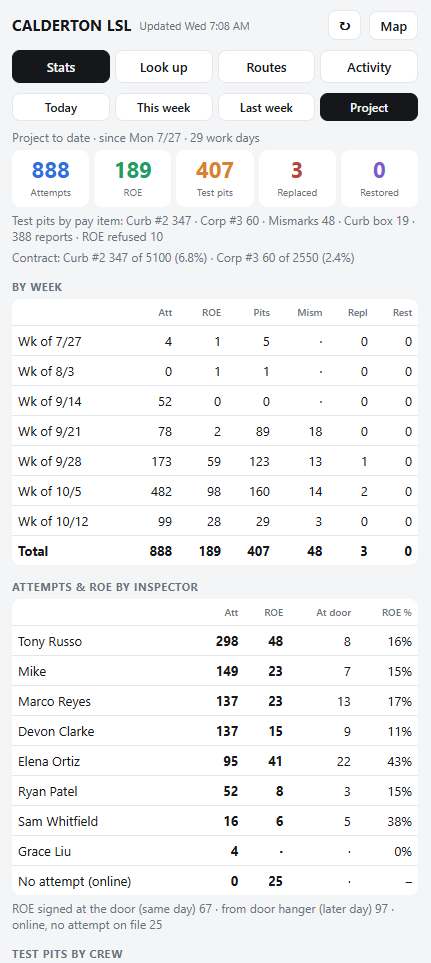
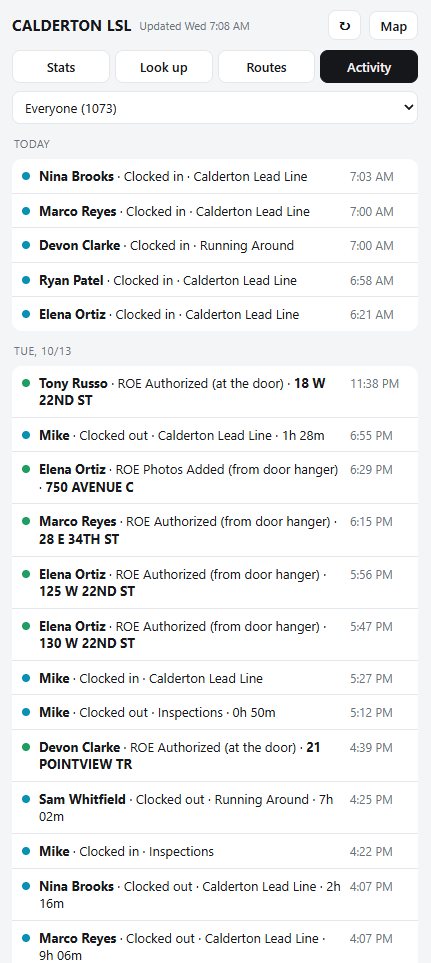
A play-by-play of the project as it happens. Who is on the clock and since when, how many doors were knocked, how many said yes, how many pits were dug, and how that stacks up against the week and against the whole contract — refreshed through the day without opening the platform.
Employees' locations are on the map, with their progress updating in real time as the work is logged. If you need a route or a property while you are out, look it up on the phone: the crew's stops for the day, or the full record on any house.
The route planner and the phone dashboard are real screenshots of the app running on demo data. The other three panels are drawn to match the real screens and documents. Every resident and crew member shown is invented. We will not put another client's residents on a marketing page. Ask for a demo and you will see the working platform, with your own program in it.
Who it's for
Every lead program has an owner, an engineer and a water utility. Each gets a link and a code — no account to create, nothing to install — and every lookup is logged.
Cities and boroughs
You answer to the residents and to the state. You need to be able to look it up yourself.
Engineers
You verify and approve. Your unit of work is the property, not the aggregate.
Water utilities
You own the asset record. You care what was found, not how the week went.
Which is where it came from. Routing, markout tracking, the two-week look-ahead, crew productivity and pay quantities exist because a contractor needed them to get through a program without losing a day to paperwork.
How it works
Your city, your engineer, your utility, your contract label, your status vocabulary and your pay items. Your crews and inspectors. Nothing is hardcoded to somebody else's job.
The service line list you already have, however it is formatted. Columns are mapped on screen, you see exactly what will be created or updated before anything is committed, and addresses are matched on premise ID so a re-import never doubles the list.
No app store, no accounts, no devices to manage. It opens on whatever phone the crew already carries and saves to the home screen. Every entry is attributed to the person who made it.
The city, the engineer and the utility each get their own link and code, read-only, revocable one at a time. Records and media export to storage you own on a schedule, so the program's history is never only in one place.
What's included
Priced per contract, because no two lead programs are the same size. Here is what the engagement covers.
Questions we get asked
No. The city, engineer and utility each get a link and a code. There is nothing to sign up for and nothing to install. Only the people who administer the program sign in.
You do. It is your program's record. We operate the system; the records and the media are yours, you get them back in open formats on request, and a complete copy is delivered to storage you own on a schedule so you are never dependent on us to answer a records request.
You get a full export — every record and every file — and your data is removed from our systems once you confirm you have it. Your copy keeps working without us, because it is delivered in formats you can open yourself.
The inventory itself is a public record. Under the Lead and Copper Rule Revisions every water system has to make its service line inventory publicly accessible, and systems serving more than 50,000 people have to publish it online. What does need care is the homeowner contact details and the signatures on right-of-entry forms, and those are handled accordingly.
Yes. Every property carries coordinates and a premise ID, so it joins to what you already have. That can be a read-only feed your GIS reads directly, or a scheduled export — whichever fits how your system is set up, including systems that sit behind your own firewall.
Not fully, and we would rather say so. The crew screens need a connection. For basements and back yards with no coverage, the practical answer is to capture at the curb and submit when the phone comes back — which is how crews use it today.
It can run inside your own cloud tenant, under your administrators and your retention rules, if that is what your policy requires. It cannot be installed on a server inside your building — if that is a hard requirement, we will tell you plainly that this is not the right product rather than waste your time.
Days, once we have your inventory list. The long pole is usually getting that list out of whoever is holding it, not the set-up.
See it
A walk through the live platform on a sample program — the crew screens on a phone, the property record, the look-ahead and the client view. Half an hour, no slides.
Or email sales@foreman.solutions directly.